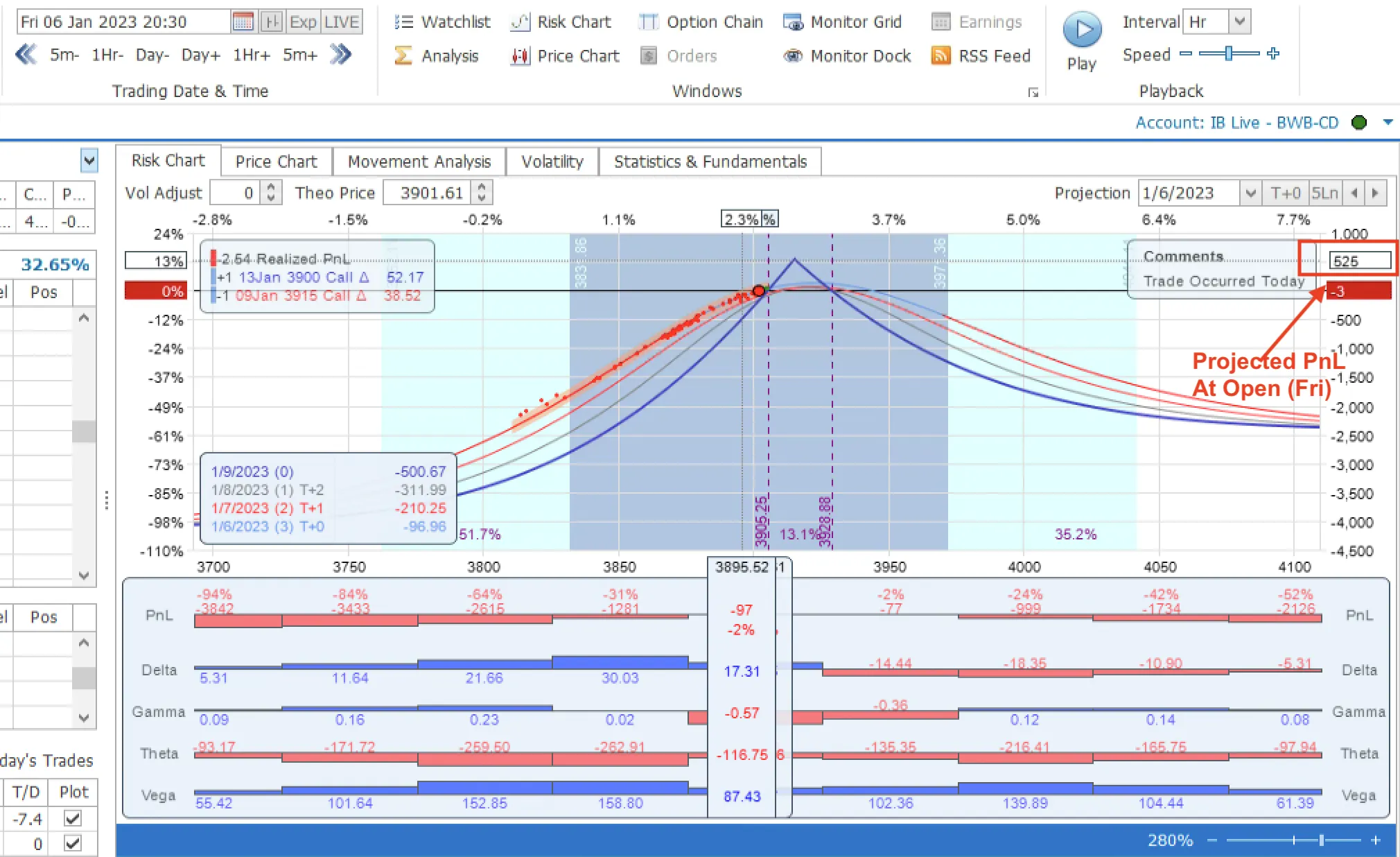
🤖 We're Thrilled to Announce the Integration of ChatGPT with MesoSim, the Advanced Options Simulator!
As we continuously strive to provide our users with the most innovative and efficient tools in the financial technology space, the incorporation of MesoSim's Knowledge Base to ChatGPT represents a major advancement in how you can interact with our platform.
Enhanced User Interaction: ChatGPT's cutting-edge AI capabilities allow for a more intuitive and conversational user experience. Whether you're querying complex options strategies or seeking help with Strategy Definitions, ChatGPT is here to assist you in plain language.
Personalized Support: Get instant, AI-driven answers to your queries without waiting. From explaining the Greeks in options trading to offering step-by-step simulation guidance, ChatGPT tailors its support to your unique needs.
Education and Insights: Alongside its support functionalities, ChatGPT serves as an educational companion, offering explanations, tutorials, and valuable insights to enrich your trading knowledge and decision-making.
Continuous Improvement: The integration is just the beginning! We're committed to evolving the platform's capabilities, ensuring that MesoSim remains at the forefront of technological innovation in the trading world.
Get Started: Dive into a seamless, smarter trading experience today. Engage with ChatGPT on MesoSim and explore the enhanced possibilities at your fingertips.
Thank you for being a part of our journey. We're excited to embark on this new chapter with you, pushing the boundaries of what's possible in options simulation. Your feedback is invaluable to us as we work to make MesoSim your go-to platform for all things options.
Disclaimer
While ChatGPT can now create MesoSim Strategy Definitions, it may suggest strategy definitions that do not fully capture the specified trade. Additionally, it might omit optional fields, leading to warnings in the Strategy Editor. Most of the time, these warnings can be safely ignored.
This article was originally written for MesoSim v2. In MesoSim v3, the agent is now called the MesoSim AI Assistant, and the always up‑to‑date entry point is available directly from the MesoSim portal via the AI Assistant navigation menu.
We are pleased to announce the release of MesoSim-v2.11. This release represents the most significant update to our codebase to date,
encompassing over six months of R&D work.
New features include:
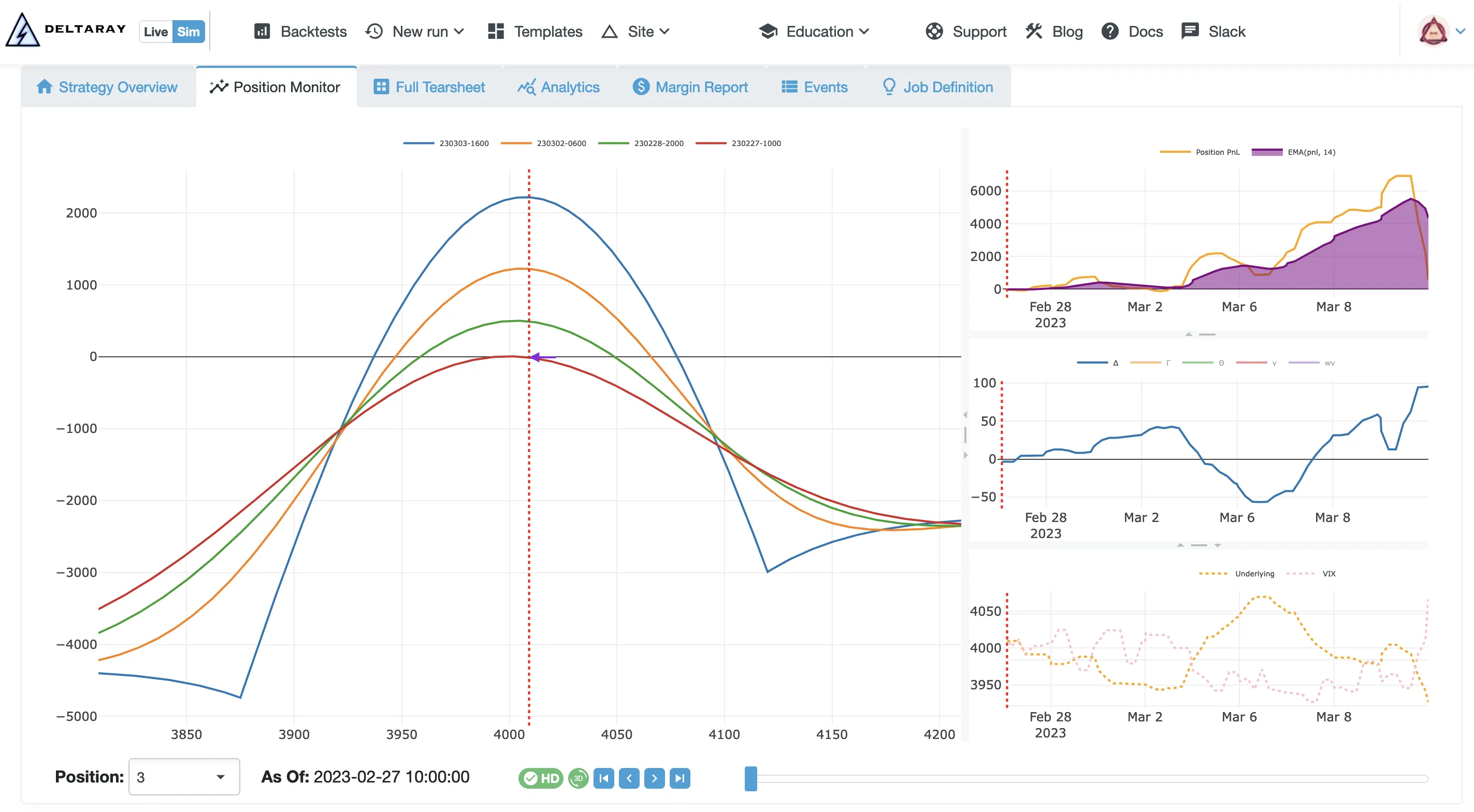
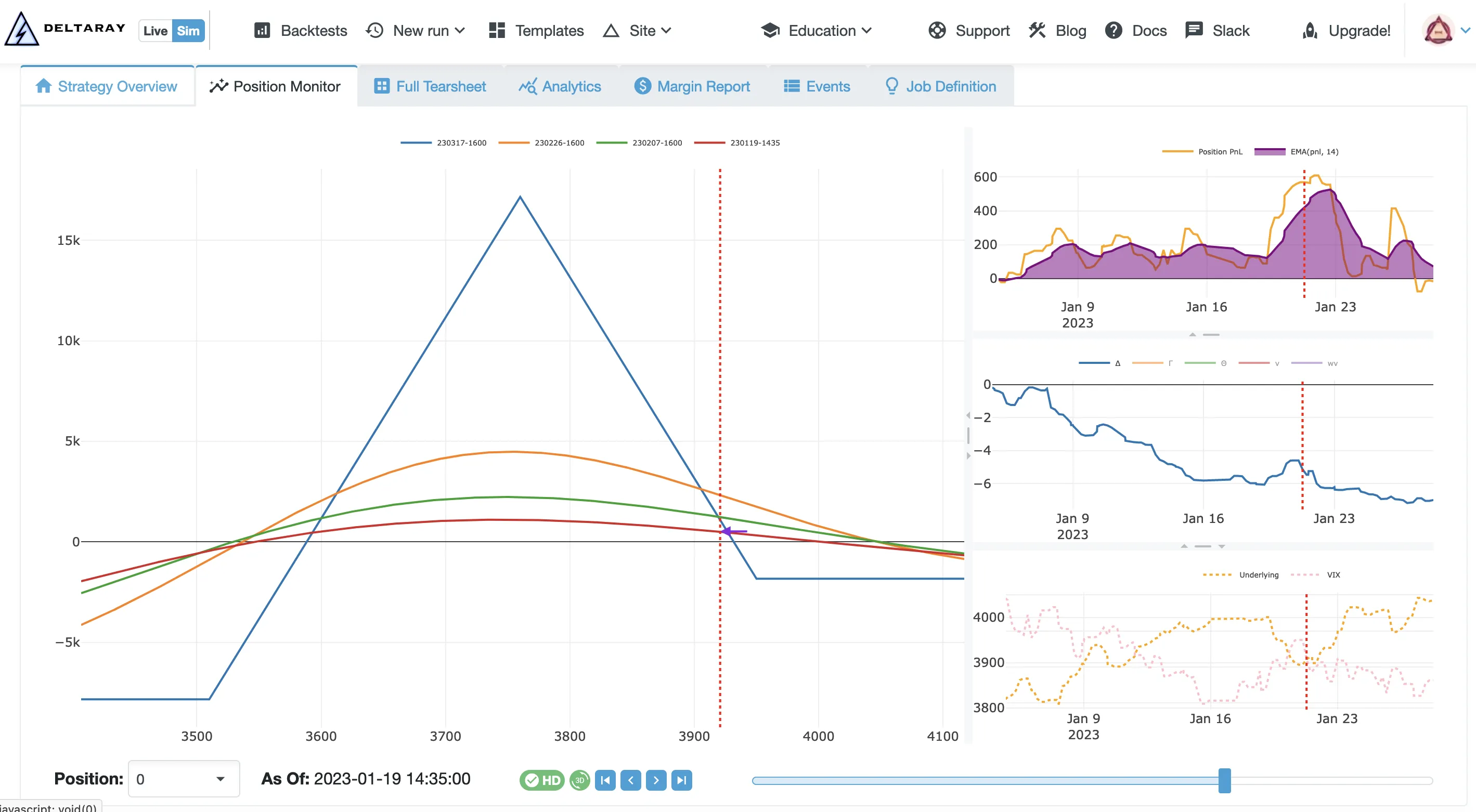
Backtest Position Monitor with high-accuracy Risk Graphs
The Backtest Position Monitor, the first feature backported from MesoLive - our live offering - provides an accurate Risk Graph along with time series of PnL, Greeks, SPX, and VIX prices.
The Risk Graph Projection utilizes BQL - our proprietary extension of QuantLib - to deliver unparalleled accuracy in modeling both short- and long-dated options. We employ the Black-Scholes-Merton (BSM) model and tackle critical yet frequently overlooked challenges:
the impact of weekends and business holidays and the determination of the risk-free rate.
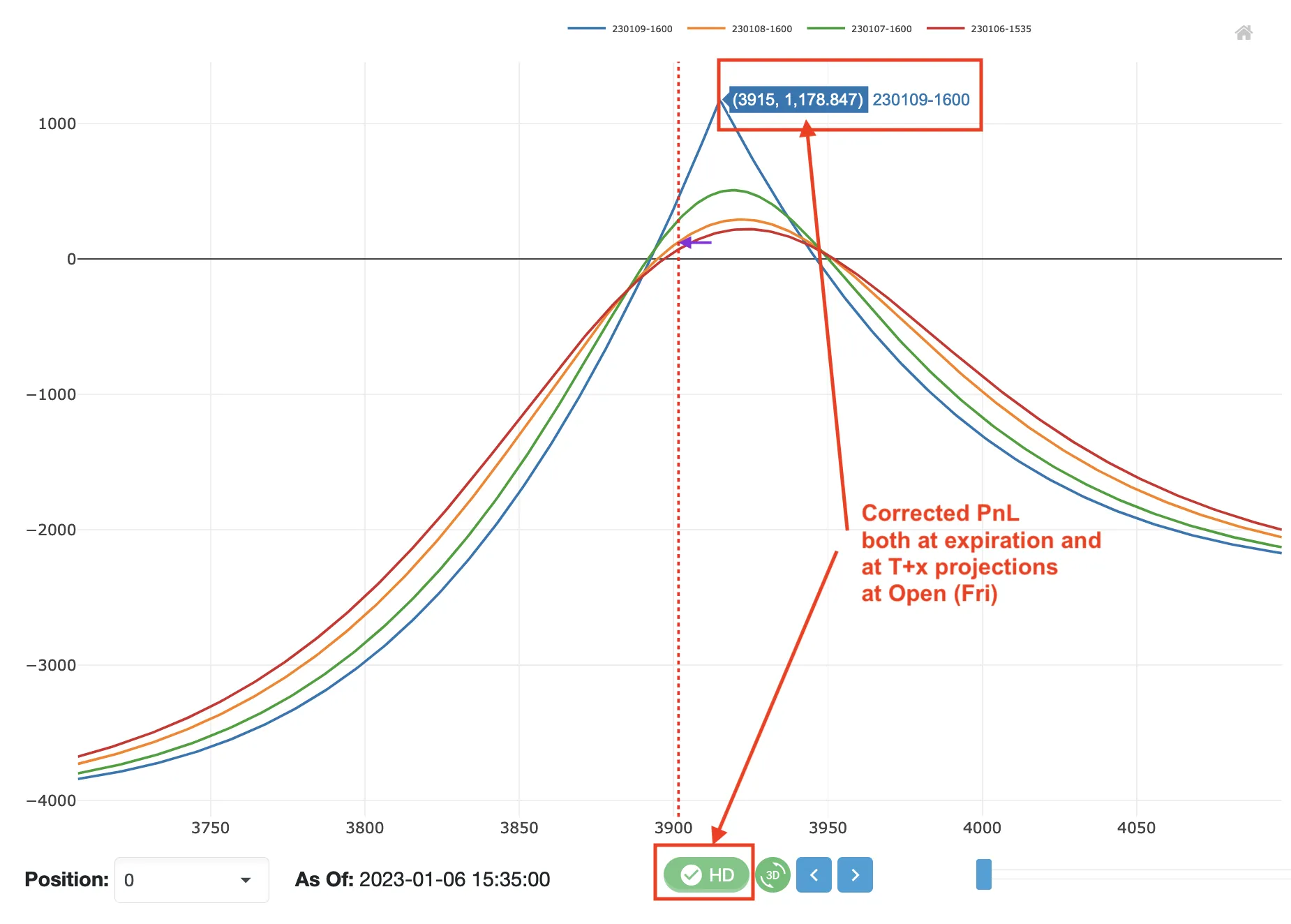
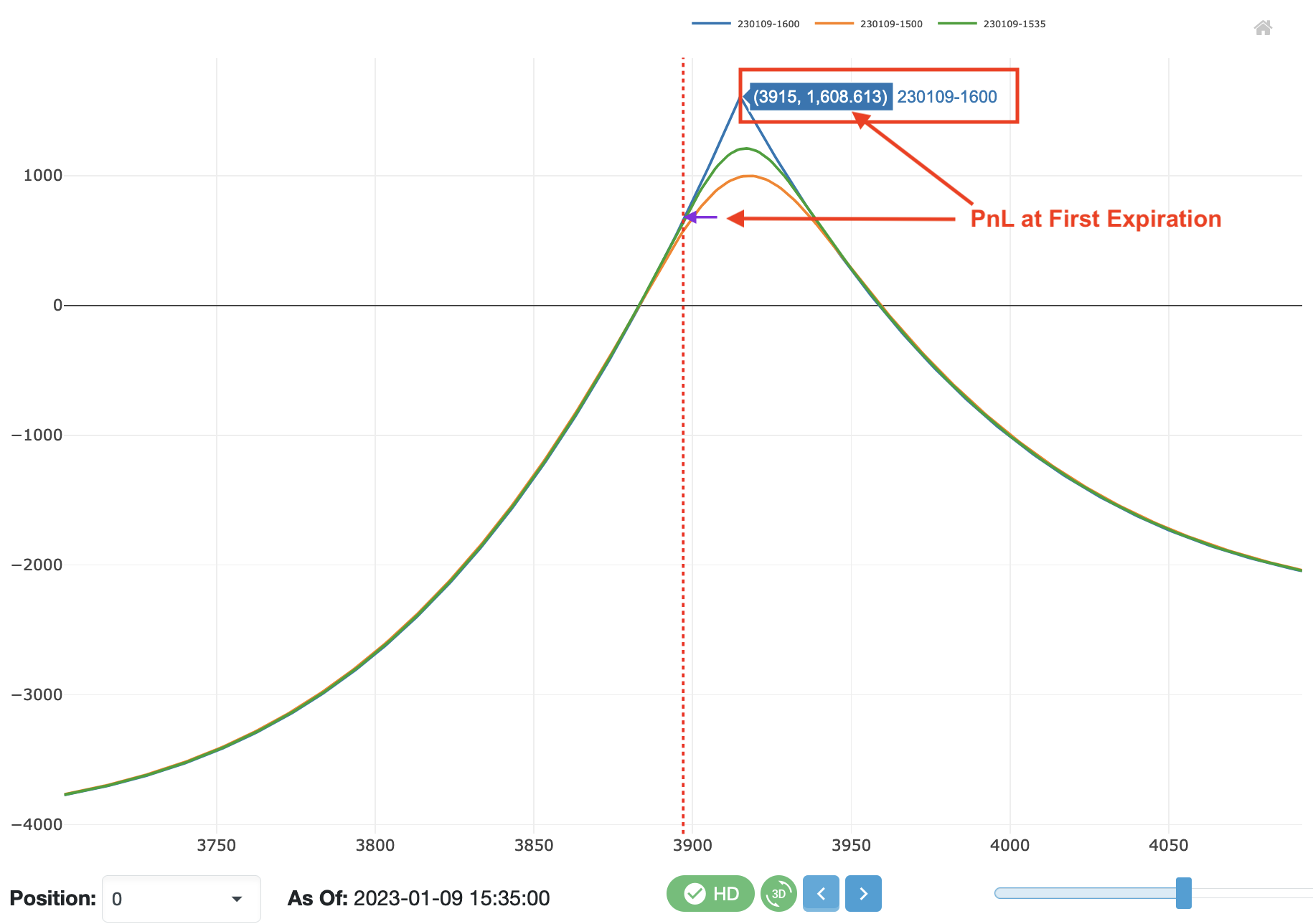
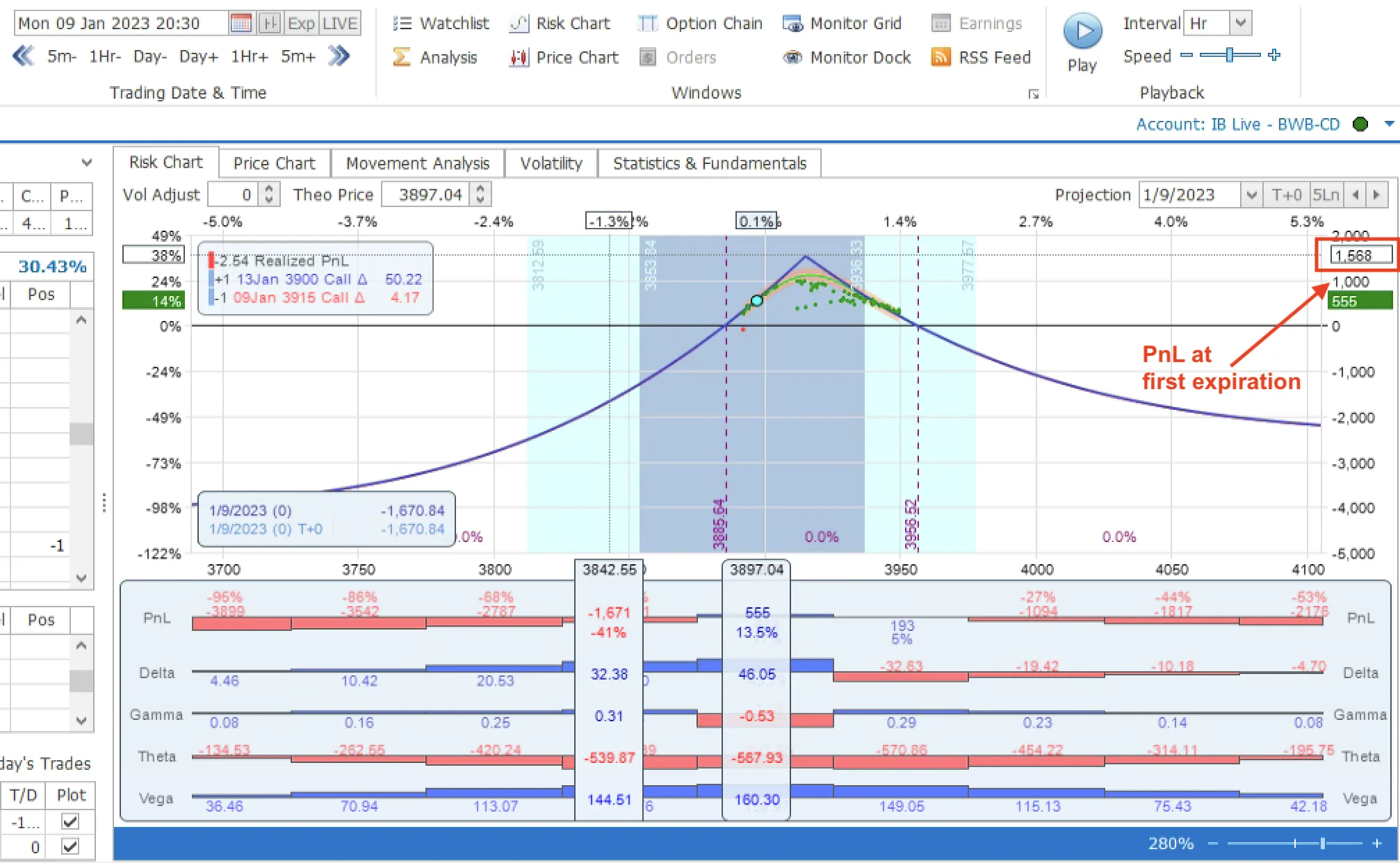
Have you ever tried to project the payout of short-dated options that span over a weekend? You might have noticed that the Risk Graph drastically changes from Friday to Monday in traditional modeling software. This is because the implied volatility (IV) on Friday accounts for the weekend, a time when markets are closed but market-moving events can still occur. With HD mode enabled, we adjust the IVs to provide a more accurate projection in MesoSim.
As the screenshots demonstrate, OptionNet Explorer (among others) tends to underestimate the payout for the outlined scenario. When HD mode is disabled, MesoSim’s Risk Graph resembles those of lower-resolution modeling tools.
The BSM Model requires the number of days until expiration to be provided. While most implementations utilize Calendar Days, it's important to note that US Index Options are tradable only on business days. To improve accuracy, we use a Business Calendar that accounts for weekends, market holidays, and early closures.
The risk-free rate is an essential input parameter for the BSM model. While US Treasury bills (T-Bills) are commonly used as a simple proxy for the risk-free rate, more accurate results can be achieved by extracting (bootstrapping) the risk-free rate from option chains. This extraction can be performed using Box Spreads, where we establish a synthetic long and a synthetic short position at
the same set of strikes within the same expirations. For European options, the payout will reflect the actual risk-free rate as implied by the option contracts.
We calculate thousands of Box Spreads to derive a stable measure for each expiration. We then apply the expiration-specific risk-free rate to project the PnL for the position in question.
Accurately determining the risk-free rate is particularly crucial for longer-dated options and has become
increasingly relevant as we move away from the zero interest rate policy (ZIRP).
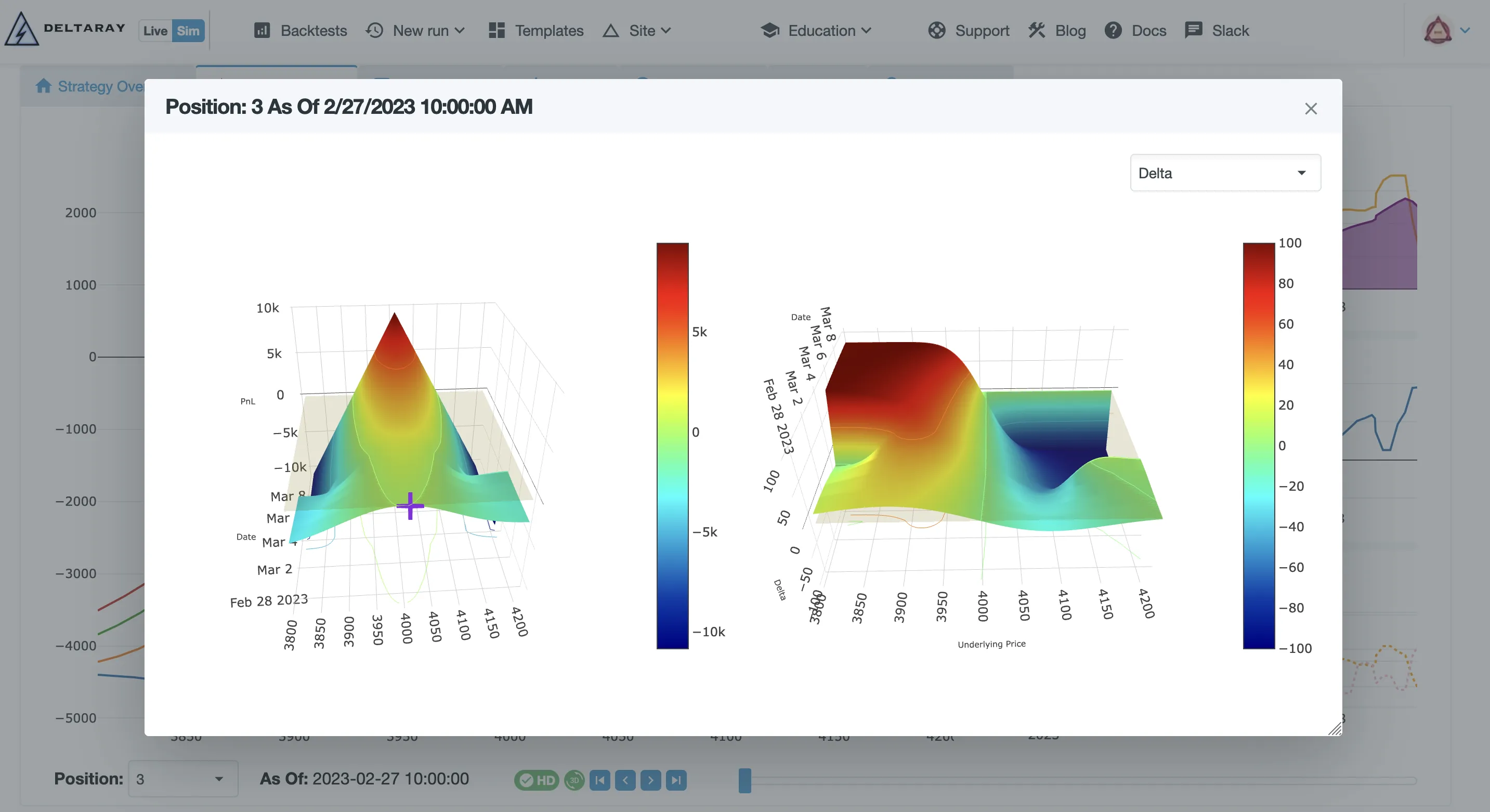
Traditional 2D risk graphs are commonly utilized to illustrate the risk profile of a position. However, due to their format, it is impractical to depict drastic changes (e.g., when a contract expires) in the projection or to demonstrate how the Greeks change over time. To overcome these limitations, we have introduced 3D graphs that display both the PnL projection and the Greeks throughout the entire lifecycle (until the last expiration) of the position.
To capture the Risk Graphs, you must enable Trace Collection through Settings.Sim.PositionMonitor. Once enabled, the information will be displayed in the Position Monitor tab of a completed backtest.
We are proud to announce that Risk Graph generation is fast!
It can sustain a rendering performance* of 24 frames per second on modern cloud hardware, enabling you to navigate through frames with minimal to no delay.
*: for a three-legged options structure using one expiration
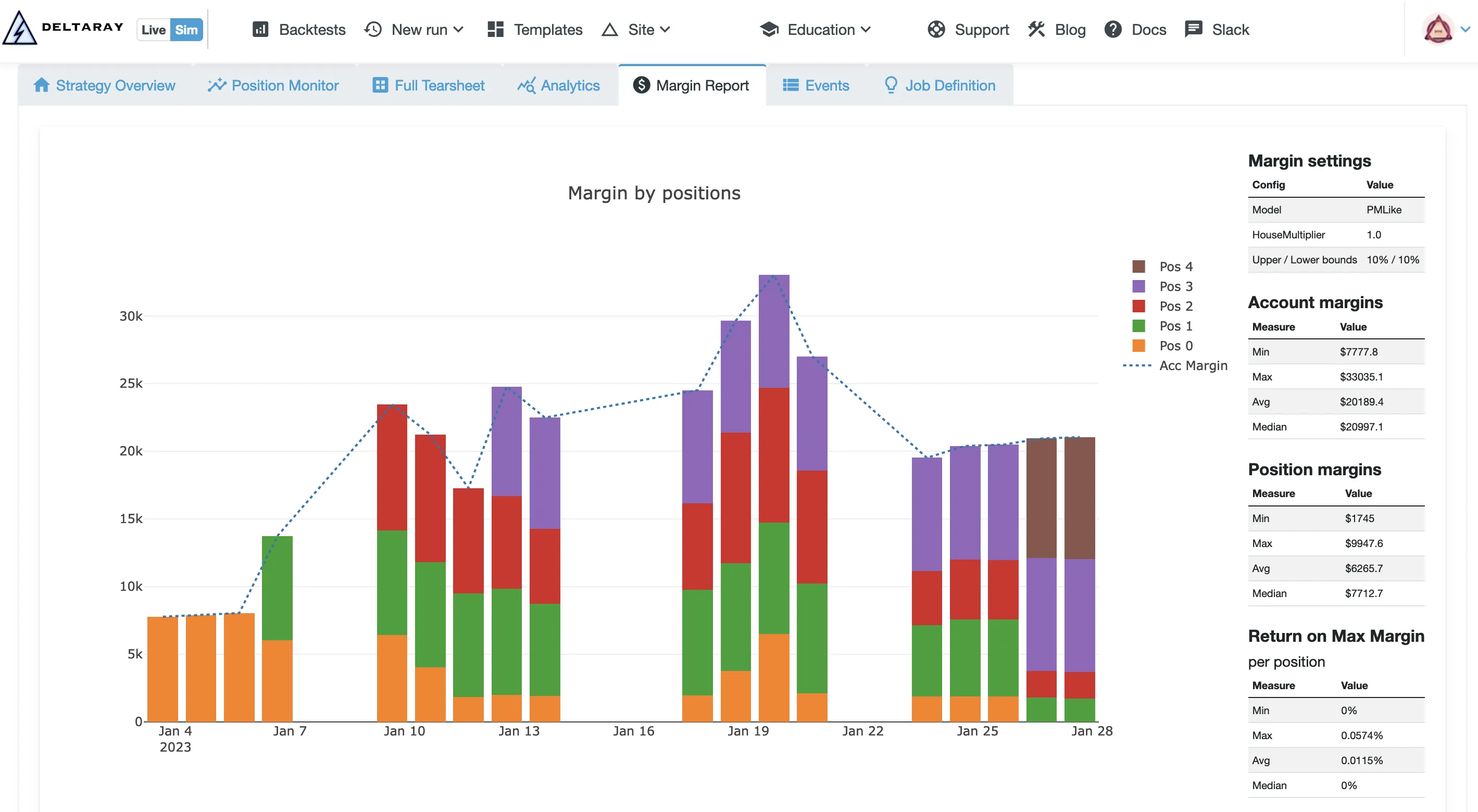
In MesoSim-v2.8, we introduced Regulation T margin, which has now been enhanced with a model similar to the Portfolio Margin used by brokerages. We utilize the technology behind Risk Graphs to approximate Portfolio Margin requirements using User-Specified configurations (including haircut levels).
As with RegT margin, the calculations are made accessible to the user via the pos_margin variable.
Margin enhancements are available in our Advanced and Academia plans.
We obtained VIX data from the CBOE some time ago. During the ingestion process, we noticed inconsistencies in some of the Greeks, leading us to label the VIX data as beta. After extensive discussions with the CBOE, they revised their models and provided us with an updated dataset. With the most recent update, the issues we identified have been resolved, and we are pleased to announce that the VIX data is now classified as stable in MesoSim.
note
VIX, along with RUT, is available in our Advanced and Academia plans.
We trained ChatGPT to know about MesoSim semantics to reduce the barrier of entry!Head to the dedicated post to learn more about this offering or try to use it directly.
We have added two variables to expose the Bid and Ask prices of the legs at any given time. These Bid/Ask prices can subsequently be utilized in all Lua fields.
By exposing the Bid/Ask prices, one can configure the Exit Conditions so that a position is exited only when both prices are present.
We would like to thank all the MesoLive and MesoSim beta testers who helped to craft the Position Monitor. We're extremely grateful for AKJ’s insights regarding the accuracy of the Black-Scholes-Merton Model!
We are actively working on MesoSim’s Optimizer, which will be available in the FundPro Plan. In addition, we plan to enhance the Documentation and Education sections of our site.
Furthermore, development of MesoLive continues as well.
MesoSim v3 Migration Note
This article was originally written for MesoSim v2. The examples and terminology have been updated to match the MesoSim v3 Strategy Definition format. For details, see the MesoSim v3.0 release announcement and the v2→v3 migration guide. The performance metrics, described behavior, and referenced run results reflect the original v2 behavior. If you rerun the referenced strategies on MesoSim v3, results may differ slightly due to behavioral changes in the simulator.

It’s been a while since we started working on MesoLive - the Live version of MesoSim. It’s a good time to give an update on what has been achieved so far.
Before we dive into the specifics here are the requirements driving the development:
MesoLive must become an excellent position, strategy, and account monitor
It must support the deployment and management of trading strategies developed in MesoSim
It has to be accurate, secure, and affordable
Based on the above requirements MesoLive is not a replica or clone of any other software. It’s a new way of addressing the real pain points of options trading today.
The majority of time spent in trading is dedicated to monitoring open positions and waiting for Profit Target or Stop Loss to be hit. While brokerages offer the tools (TWS by IBKR, ThinkOrSwim, or TastyTrade’s app) which display live positions and certain risk metrics, they lack the following functionalities:
Organizing Legs into Positions
Assigning Positions to Strategies
Tracking Position and Strategy PnL and Greeks over time
The most frequently used analytical tool for Options Trade by retail users - OptionNet Explorer (ONE) - bridges some of the gaps, but it still falls short on the following points:
Moving legs around is cumbersome:
One needs to specify trade details (such as entry price and commission) manually.
Low-resolution PnL chart on a strategy level:
Just the realized PnL is shown, but intra-trade drawdowns and quantitative metrics are missing.
Limited information on Greeks:
Historical charts of greeks over time are absent.
Greeks are shown only at T+0 and not projected to the future.
Therefore, people (including us) often track their trades not just in ONE, but in a tracker Excel or Google Sheets. This approach works but takes a lot of time to administer.
With MesoLive we are addressing the above pain points by
Automatically Tracking Positions, Executions, and Account information, eliminating the need for manual entry of fills
Combining legs on the fly to make up a positions
Assigned positions to Strategies
Collecting Position, Strategy, and Account level PnLs and Greeks frequently (every minute)
To fully address the “Limited information on Greeks” part we utilize 3D charts to display the changes in Greeks and PnL throughout the trades lifecycle. These graphs are useful to better understand the trade characteristics of position.
For open positions we show the PnL for both At Bid/Ask and at the Mark/Mid price level.
info
The monitoring capability of MesoLive is still a Work in Progress, but we believe it is already providing value compared to the currently existing solutions.
Some might think that once a trade plan is made the hardest part is over. While this is true, our experience shows that a lot of risk is present during execution. Sometimes it is hard to precisely follow the trade plan, due to:
Time constraints: you might not always be available to enter / exit or adjust
Mistakes: wrong contract selection can happen even with the best
Negligence: hopium is a hard drug
These points will be addressed by MesoLive by taking MesoSim’s Strategy Definition and turning a backtest into a live trading job. We still believe that a full hands-off mode is risky with options trading, therefore it is not our goal to develop a fully automated system here. We might revisit this decision later.
The workflow we propose for executions (Entry / Adjustment / Exit) is as follows:
Initiated from MesoLive
Legs are automatically selected, and order is prepared
Order is reviewed and submitted by the user
This part of MesoLive is not ready yet, but it is the next big work item in our roadmap.
We’ll take an iterative approach: Exits, Entries then finally Adjustments will be implemented.
While the three items in the heading seem distinctly related, they are actually defining our software architecture. Here is why:
Realtime data is expensive, especially for professionals and businesses.
Delayed data is unfeasible for trading, unless you do “buy and hold with monthly rebalances” type of strategy.
While it would be easy and pleasant to develop a solution using data feeds from Exchanges or Data Vendors, it would make the price of the offering unfeasible for retail.
Security is of very high priority when it comes to handling money.
Storing access keys to brokerage accounts comes with risks we wish not to take.
Additionally, the user must be in full control at all times managing their account.
Both of the points above are addressed with our model:
We’ve created an Agent application that is run by the user providing a bridge between their brokerage account, live data stream, and our system. The Agent is certified by trusted software vendors, such as Microsoft and Apple. The Agent uses secure communication channels with tamper-proof keys to bring in account and realtime data to our systems. It is resilient to network failures and uses minimal system resources. The user is in full control of running this application.
MesoLive has been undergoing private beta for some time now with IBKR accounts.
We’re onboarding customers have shown interest in small groups on a weekly basis.
info
Currently, IBKR TWS is the only supported platform; additional brokerages may be supported later.
We consider the Position Monitor part to be 80% ready and expect to start the execution-related tasks immediately. As MesoSim provides a rich set of tools, reaching feature parity between Sim and Live is likely to be some quarters ahead.Since the offering is fairly resource intensive it will not be free.
We are continuously improving its performance so that it can operate in a cost-effective manner. Therefore, it would be too early to put a price tag on the offering.
As MesoLive in its full form will take MesoSim Jobs to Live, it makes sense to consider it as a paid add-on to MesoSim. We might or might not release the monitoring part as a separate solution later. Execution without access to MesoSim plan is a definite no from our standpoint.
MesoSim v3 Migration Note
This article was originally written for MesoSim v2. The examples and terminology have been updated to match the MesoSim v3 Strategy Definition format. For details, see the MesoSim v3.0 release announcement and the v2→v3 migration guide. The performance metrics, described behavior, and referenced run results reflect the original v2 behavior. If you rerun the referenced strategies on MesoSim v3, results may differ slightly due to behavioral changes in the simulator.

The Lua Script engine in MesoSim empowers our users to dynamically set simulator parameters. Due to the exceptional flexibility we are proud to call our Strategy Definition a Domain Specific Language (DSL) for Options Trading.
In this post we will showcase some of the more complex setups that can be used to create more dynamic strategies.
The VarDefines section has been present since the early days of MesoSim and has become one of the cornerstones of strategy analysis. You can define and update variables on Entry, Adjustment, Exit, and at any point in time using the UpdateVarsAdjustment.
MFE and MAE are often used to study the trade's potential.These metrics capture the maximum amount of loss and profit experienced by a trade during it's lifecycle.
Calculating these metrics requires us to keep two variables (MAE and MFE) updated throughout the position. Similar to the High Watermark in a Trailing Stop, the variables should be updated conditionally: whenever a new high or low is reached.
Rafael has chosen to do the conditional variable setting using Lua Ternary operator (more on this later):
"ConditionalAdjustments": { "true -- execute always": { "UpdateVarsAdjustment": { "VarDefines": { "MFE": "(pos_pnl - MFE > 0) and pos_pnl or MFE", "MAE": "(pos_pnl - MAE < 0) and pos_pnl or MAE" } } } },
MesoSim provides the five common Greeks (delta, gamma, theta, vega, rho) as well as Weighted Vega out of the box. What if you would like to use other higher-order Greeks, such as Vomma, Speed, or Charm?
These metrics can be calculated easily using the VarDefines section in Entry, Adjustment, and Exit. Let's take Vomma as an example:
In this example, we're leveraging that VarDefines are evaluated in order of appearance.
With sequential evaluation, we can refer to previously set variables in our calculations.
Some strategies, like the Black Swan Hedge by Ron Bertino, rely on the market state at initiation to construct the full trade structure at a later time. To support this setup we introduced the concept of 'marker leg', which captures the initial state for a subsequently added leg.
Marker legs can be created by specifying Qty=0 at entry:
That the Black Swan Hedge is a proprietary trade and therefore it is not shared here. The above run just shows the required building
blocks to build the BSH.
We would like to target $100 as a Profit target in the first 10 days of the trade, then after the 11th day in trade, we reduce our Profit Target to $50.
In Lua the if-then-else type of constructs can be expressed using the ternary semantics:
(condition) and (statement-for-true-condition) or (statement-for-false-condition)
Expressing the above example in Exit.Conditions:
"Exit": { ... "Conditions": [ "(days_in_trade <= 10) and (pos_pnl >= 100) or (pos_pnl >= 50)" ] }
Ternary operator is probably the most versatile construct. It allows you for example to select deltas based on other variables (indicators, internal or external data), enter or exit conditionally.
With version v2.10 we converted all the fields in the strategy definition to Lua Statements. Doing so you are now allowed to change the Schedule programmatically and create schedules dynamically.
As part of strategy robustness test it might be useful to know how your strategy performs if you enter / exit / adjust different times of the day. This can easily be achieved by setting the respective Schedule to random:
The statement random(30, 210) instructs the Script Engine to draw a random number from the range of 30 to 210. We use 210 minutes here to support early closes of the exchange.
With this approach, you just need to run your strategy a couple of times and see how its performance changes with the randomized schedules. This approach is also useful if you would encounter any Missing Data related problems in your runs.
Our users with a paid subscription are capable of extracting Event Logs and OptionNet Explorer exports from runs. The Event Log is particularly interesting if you would like to roll your own analytics as it captures the simulation state in every processing step.
[ Contributed by Brent P - Thank you! ]
To study how Event Log processing can be done we recommend taking a look at Brent's mesosim-stuff repository. It contains post-processers for events and NAVs:
NAV Combiner to see performance profile of multiple runs combined
Hedging power studies for various long puts
PnL by entry to see if vega/theta/delta/rho drives the final PnL
Delta Hedging using SPX prices (needs modification)
We hope the above patterns will help your studies related to Options Backtesting in MesoSim.
MesoSim v3 Migration Note
This article was originally written for MesoSim v2. The examples and terminology have been updated to match the MesoSim v3 Strategy Definition format. For details, see the MesoSim v3.0 release announcement and the v2→v3 migration guide. The performance metrics, described behavior, and referenced run results reflect the original v2 behavior. If you rerun the referenced strategies on MesoSim v3, results may differ slightly due to behavioral changes in the simulator.

At Deltaray we are committed to providing retail traders and institutions tools that help them make informed trading decisions. As part of this initiative, we are releasing a Free API today, which provides access to some of the building blocks of MesoSim and MesoLive.
In trading, the ultimate goal is to increase your capital while minimizing the risk to an acceptable level. Measuring risk is a complicated process. Even the simplest risk metric - Max Drawdown - requires you to keep track of the highs and lows in a rolling manner. When evaluating strategy performance, it is advised to study the Risk-Adjusted Return (e.g., Sharpe or Sortino), which takes both returns and drawdowns into account.
In MesoSim and MesoLive we are using Ran Aroussi's excellent QuantStats library to calculate quantitative metrics and create portfolio analytics tearsheets.
With Q-API we are releasing the tearsheet generation and risk metrics calculation free for personal use. These functionalities are
available using the following endpoints:
/quantstats/v1/tearsheet-from-json
/quantstats/v1/tearsheet-from-csv
/quantstats/v1/metrics-from-json
/quantstats/v1/metrics-from-csv
Both endpoints require the user to provide the Strategy Performance and a Benchmark Price (such as ^SPX) as time-series.
It's important to know when we can engage in a particular activity we're interested in. This holds true for trading as well; it's essential to be aware of the market's opening and closing times, including early closures.
Q-API enables the users to access this information using the /market-calendar/v1/trading-hours endpoint. Our trading calendar's historical data dates back to 1998.