
MesoSim v3.3: Job Editor v2, Redesigned Backtests, and Usage Allowances
We are happy to release MesoSim-v3.3. This release reworks the pages you use most:
- Job Editor v2: checks as you type, problems marked in the code, autocomplete
- Backtests: search by strategy, metric conditions, and date filters
- Backtest Details: a new overview with the first entry's risk graph
- Usage allowances: weekly SimTime, 20 GB of storage, and usage credits
Since the v3.2 release brought API access to Retail users, more and more backtests are run from scripts and AI agents. More strategies, more variations, more results. With v3.3 we wanted to make that workflow comfortable in the portal too: write a strategy with fewer mistakes, find the interesting runs among hundreds, and understand a strategy from one page.
The screenshots in this post use strategies from our built-in template library, run with MesoSim v3.3 over 2025, with $250,000 for the SPX strategies and $50,000 for the GLD short put, and MesoSim's default fill and commission settings.
Job Editor v2
The Job Editor is where strategies are written, so we started there. Until now, the editor reported problems only after you pressed Validate, as a numbered list that didn't point at a line.
Job Editor v2 checks the strategy while you type. A problem is underlined where it is, with a short message at the end of the line. Hovering the mark explains the problem and offers a fix when one is clear, such as replacing a misspelled variable with the one you meant.
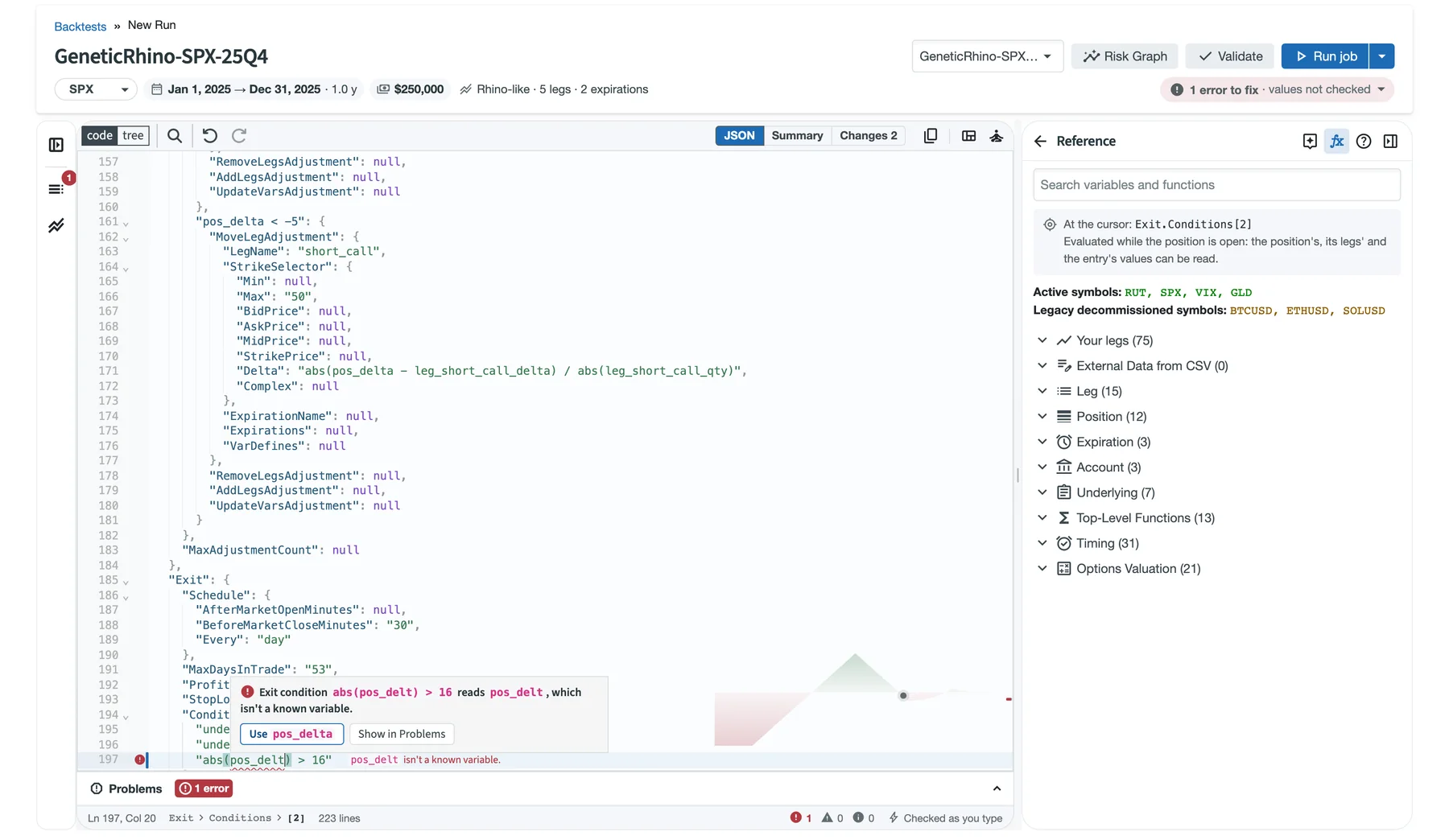
A typo in Genetic Rhino's exit condition is marked in the code. The hover card offers the fix, and the header says "1 error to fix".
Autocomplete suggests the names an expression can read at that point: your legs, your variables,
position and account values, functions, and the members of timing. and options..
It knows the context, so an entry condition is not offered leg values that don't exist yet.
Each suggestion comes with its description from the reference.
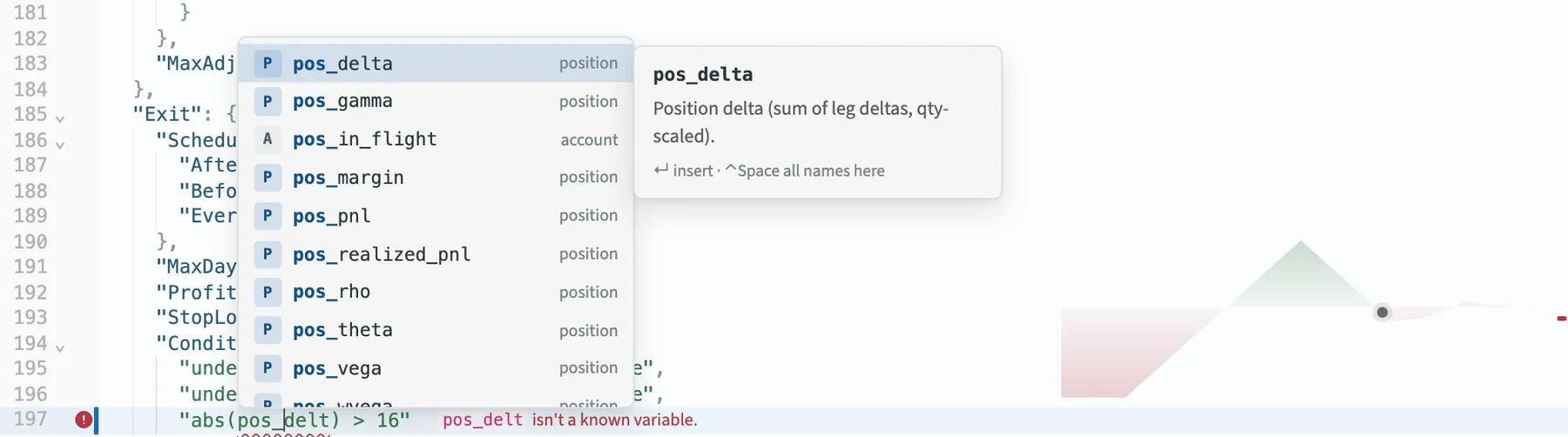
After pos_, autocomplete lists the position's values, each with its description.
Behind the code, in the editor's lower right corner, you'll see the P&L at expiration of the structure you are editing. It follows your changes, so you see the shape of the trade change while you move a strike or a delta. The Risk Graph button shows the full picture at the first entry, with the P&L curves through the life of the trade.
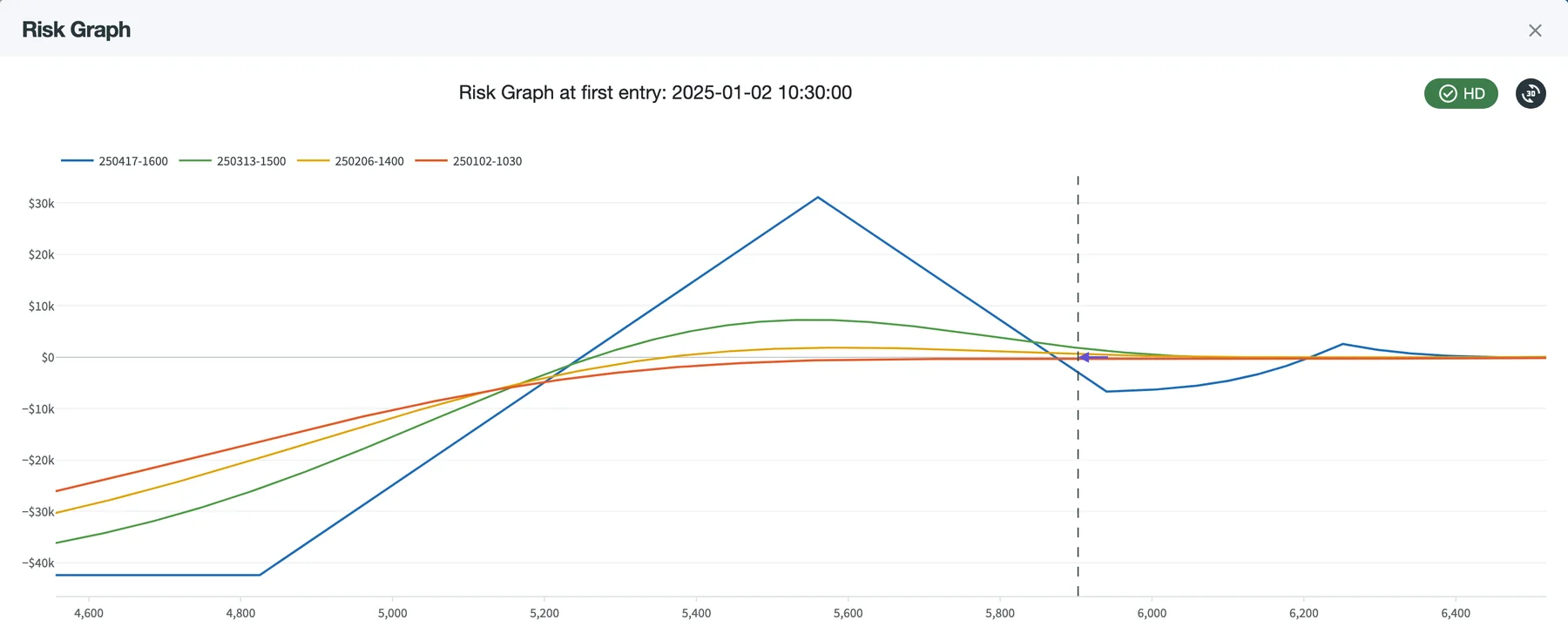
Genetic Rhino at its first entry: the broken wing butterfly's tent below the price and the calendar above it take shape as the first expiration (blue) approaches. SPX is at the dashed line.
A few more things we think you'll like:
- Summary describes what the strategy does in plain English, with the legs as a table (see the Strategy view below). Changes shows what you changed since loading the strategy, from a backtest, a template or the AI Assistant.
- The left sidebar has an Outline of the definition with problem counts per section, and At a glance: the legs, the expirations and the payoff's shape.
- The Reference panel shows what the expression at the cursor can read, and inserts a name with one click.
- When the JSON can't be read, the editor points at the slip, such as a missing comma or an unclosed bracket, and offers the edit to fix it.
- The layout has three panes that you can resize or fold, and a zen mode that shows only the editor.
Backtests
Running backtests through the API or an agent can give you hundreds of results in a day. The Backtests page now opens on your results and helps you find the ones worth a closer look.
- Search suggests your strategies as you type, the most used first. Pick one or more to list only their runs.
- + Condition filters by any metric column, such as
Sharpe > 1,CAGR < 0or a maximum drawdown, with quick picks for losing strategies and runs with too few trades. - Date filters by when a backtest was created or finished, or by its backtest period, with a chart of your backtests per day or month.
- Every active filter is shown as a chip, with the number of matching backtests and their size. Select all selects every match, not only the visible page, for bulk cancel or delete.
- Your running backtests sit in one line above the results, with their progress.
- The idea box at the top takes a strategy idea in your words and hands it to the AI Editor.
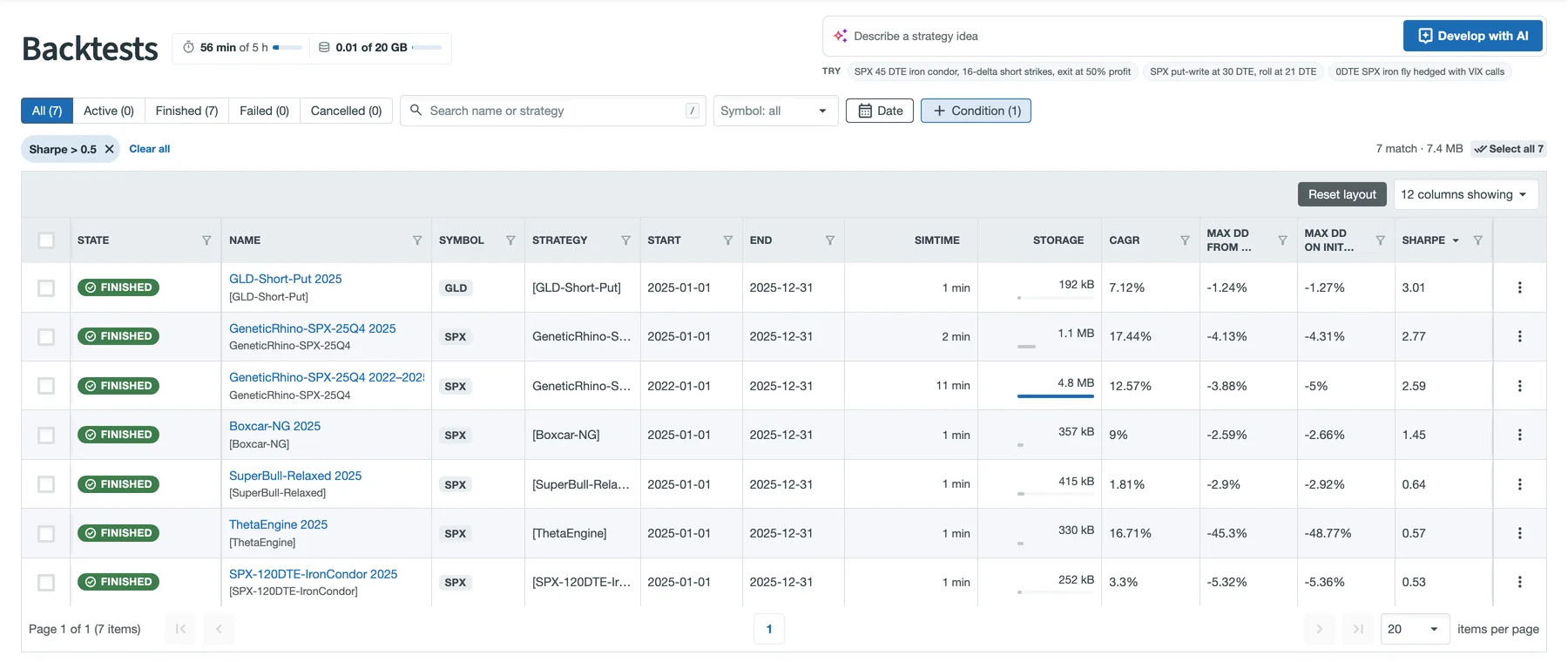
The built-in template library as a result set: Sharpe > 0.5 leaves 7 of 17 runs, sorted by Sharpe.
Backtest Details
The Overview tab of a backtest has been redesigned so that the important information is visible without scrolling.
- The header shows the strategy's facts (symbol, period, cash, structure, legs and expirations), when it ran, and the actions: Clone, Trade Live, Ask AI, Export and more.
- Headline tiles show the cumulative return with a sparkline, CAGR, maximum drawdown, Sharpe (or Sortino), win/loss rate and trade count. Maximum drawdown is shown on initial capital; click the tile to see it from peak.
- Equity shows the cumulative return, as log returns or as a series, with the drawdown below it and SPX as a benchmark. You can add the account Greeks and the per-trade P&L as panes on the same time axis.
- Strategy explains the strategy in plain English: the backtest's settings, the legs, when it enters, how it adjusts, when it exits, and when each check runs during the trading day. The Job Editor's Summary shows the same while you write.
- First entry shows the risk graph of the first position as it was filled, with its credit or debit, delta, theta, vega and legs, and the maximum loss at expiration when all legs expire together.
- Next steps suggest what to do with the result: refine it, check with StatSim that the returns hold up, inspect the positions, trade it live, or save it as a template.
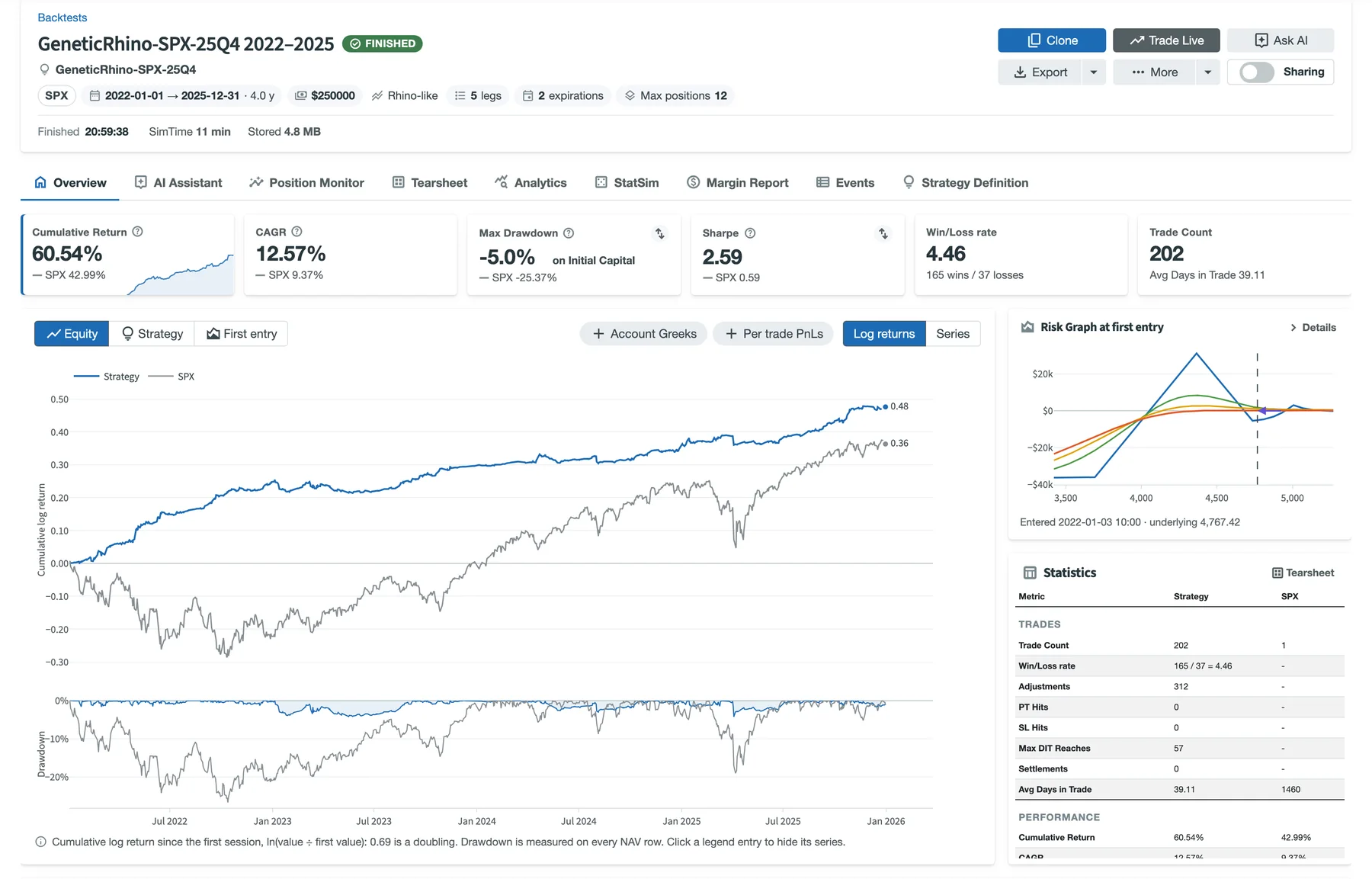
The Genetic Rhino template from 2022 to 2025 on $250,000. This is the period the template was optimized on, so these are in-sample results.
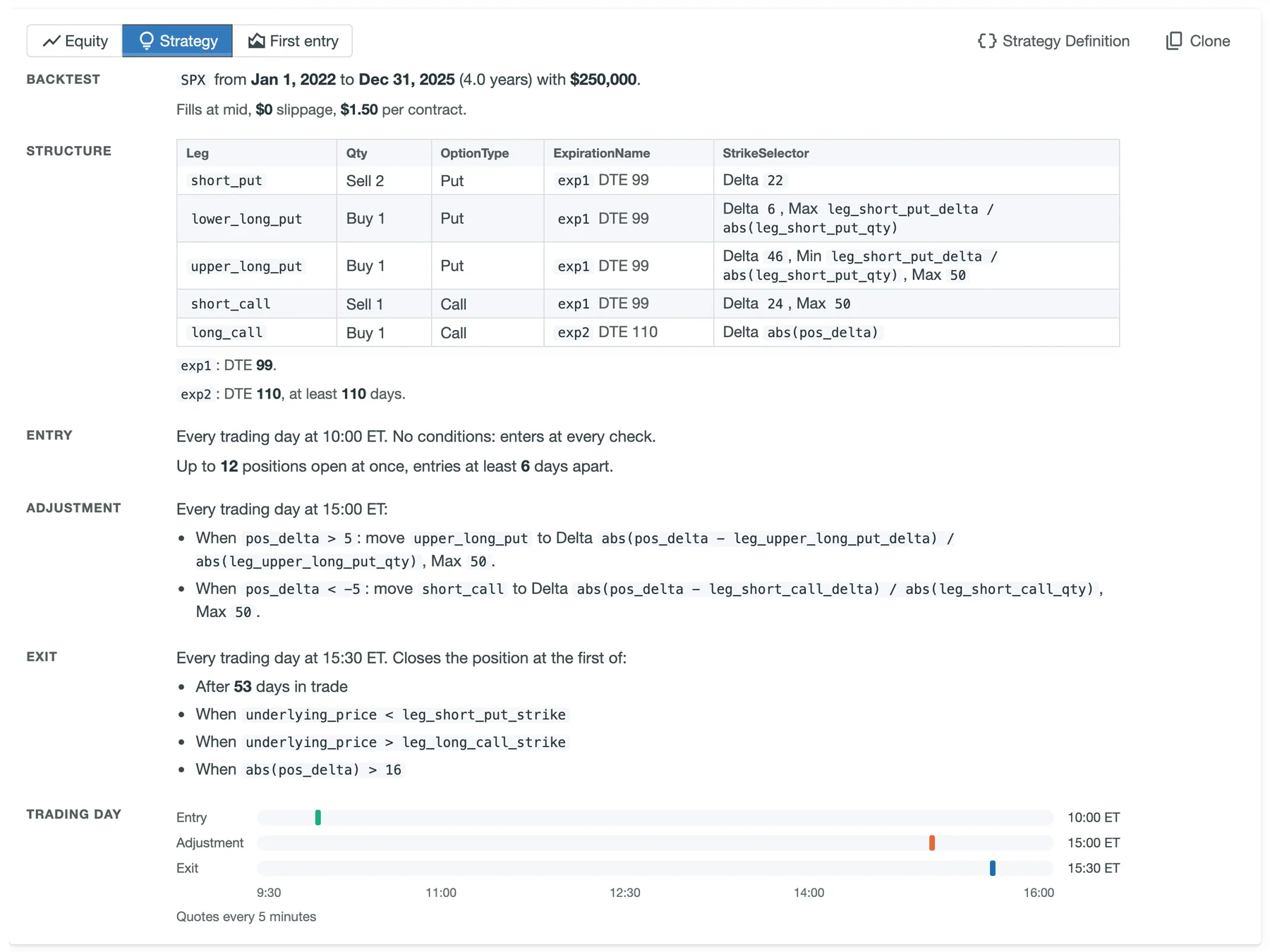
The Strategy view reads the Genetic Rhino definition back in plain English, with its trading day at the bottom.
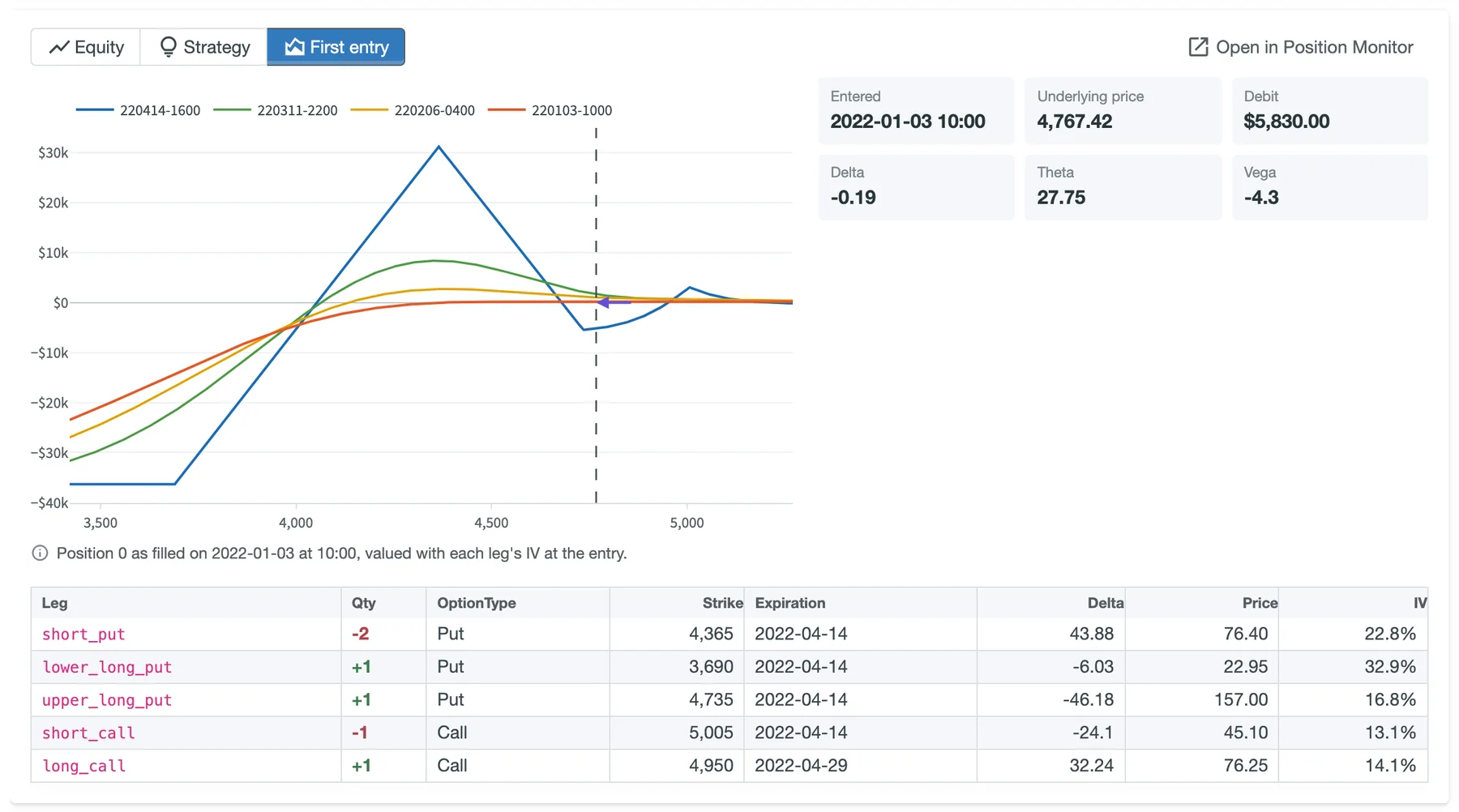
First entry: the position as it was filled, with its risk graph, Greeks and legs.
While a backtest runs, its page and the Backtests list show its progress. Failures are reported with the reason, so you can fix the strategy and run it again.
Research at scale with the API
The MesoSim API and our Codex and Claude plugins let you, or your agent, test many variations of a strategy: submit runs, wait for the results, compare them and decide what to try next.
With v3.3 your research has a clear budget. Every Retail plan comes with a weekly SimTime allowance, and usage credits let you continue when a large experiment needs more. The API follows the same rules as the portal:
GET /api/v1/usagereports this week's SimTime, what is left of it, your credits and your storage, so an agent can plan its next batch.- When the allowance is used up, a submission answers
429withRetry-Afterand a message that explains what can be done. POST /api/v1/backtest-deletionsdeletes many backtests in one request and reports the progress.
Usage allowances
When we started, everything was done through the UI, and we were able to offer plans without storage limits. Since we enabled API access for Retail customers, usage has grown significantly. To keep the service reliable for everyone, usage is metered from MesoSim v3.3 and generous limits apply.
SimTime is the time our servers spend running your backtests, failed and cancelled runs included. It is sold and allowed in SimHours. Storage is the space your results take, in GB.
| Trial (14 days) | Standard | Advanced | |
|---|---|---|---|
| SimTime | 3 SimHours in total | 2 SimHours per week | 5 SimHours per week |
| Storage | 20 GB | 20 GB | 20 GB |
| Backtests at once | 2 | 4 | 4 |
The weekly allowance resets every Monday at 00:00 UTC. The first week counts from Monday, October 19, and SimTime used before v3.3 isn't counted, so this week's allowance is available in full. FundPro has dedicated capacity and isn't affected.
About 95% of our customers use less than these limits, so for most of you nothing changes. You can follow your usage on the new Usage page, from the profile menu, and in the usage pill on the Backtests page.
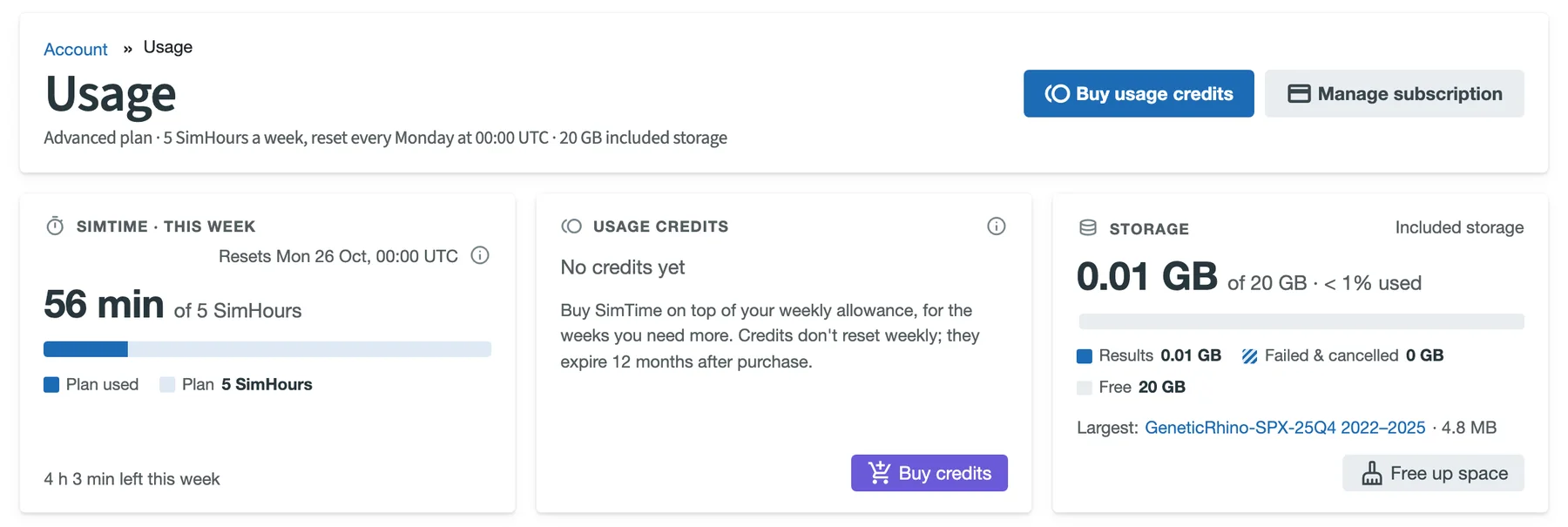
The Usage page states the plan's allowance and shows this week's SimTime, usage credits and storage. Below the cards: SimTime per week over the last 12 weeks, storage by age and by state, and Free up space.
When you need more
For the remaining customers, mostly API users, we built the tools to keep backtesting:
-
Usage credits add SimTime beyond the weekly allowance. They are used automatically once the allowance runs out (you can turn this off), and they expire 12 months after purchase. Credits are available for active Standard and Advanced subscriptions; Standard users can also upgrade to Advanced.
Pack SimTime Price Starter 5 SimHours $30 Research 20 SimHours $100 Scale 50 SimHours $200 Prices exclude tax. See Manage Subscriptions for the current offer.
-
Free up space on the Usage page suggests what to clean up: failed and cancelled runs, repeated runs (the same strategy with identical settings, symbol and period, keeping the newest), runs finished more than six months ago, and the largest ones. Each suggestion opens the matching backtests on the Backtests page for review, and bulk deletion removes them in the background.
-
Keep summaries, remove result files is a lighter delete. It keeps the backtest's name, strategy, metrics and tearsheet in your list, and deletes the trades, the event log and the other reports, which take most of the space. If you need them again, Run again recreates them.
A backtest that is already running when the allowance and your credits run out keeps running up to 10% over the allowance; beyond that, it is stopped. New backtests can start again when the allowance resets or when credits are available.
We have reached out by email to the customers who are affected. If you didn't receive an email from us, there is nothing to do.
If you did, you need to free up space to continue backtesting. Please do this after the release: the Usage page, bulk deletion and Keep summaries, remove result files make it much easier than before.
We will be watching the usage of the system in the following weeks, and we might adjust the limits to best suit everyone. If your research needs a different setup, let us know.
Other improvements
- Projected vega, theta and weighted vega now match the position Greeks.
- Reg-T margin accounts for uncovered risk in option combinations.
powandlog10work again in Lua strategy expressions.- A
nilquantity or selection target now fails the backtest instead of being read as 0. - Backtests left behind by a worker are settled, so they don't stay running forever.
- Large accounts list and filter their backtests faster.
The full list is in the release notes.
Closing thoughts
MesoSim v3.3 makes the path from an idea to a tested strategy shorter: write it with fewer mistakes, find the best runs quickly, and understand them from one page. The usage allowances let us keep the service fast and reliable as more of you test at scale.
As always, we look forward to your feedback.